Nonprofit Budgeting Software

Budget by fund, program & grant — without spreadsheet chaos

Dynamic Budgets helps nonprofit finance teams run a controlled, collaborative budgeting process with unlimited users, approvals, audit trails, and ERP-integrated actuals. It’s purpose-built for budgeting and forecasting — not an everything-platform that takes months to implement.

Unlimited users Approvals & workflow Audit trail Driver-based budgeting Allocations ERP-integrated actuals
Positioning for outranking: This page targets high-intent queries like “nonprofit budgeting software”, “budget by fund program grant”, “excel budgeting alternative”, and “budgeting approvals audit trail”, while reinforcing “simple + fast implementation” (where heavy CPM platforms are weak).

Why nonprofit budgeting breaks in spreadsheets

If your budgeting cycle includes “email the template”, “merge versions”, “fix broken formulas”, and “hope the rollups match” — you’re not alone. Nonprofits often need to budget by fund, program, grant, department, location (and other dimensions), while maintaining transparency and auditability for leadership and board review.

Version sprawl

Multiple spreadsheet versions create rework, errors, and missed approvals. “Final_v7_revised2” is not governance.

Low transparency

Spreadsheets make it hard to track who changed what, why it changed, and whether leadership approved it.

Dimensional complexity

Fund/program/grant budgeting increases the risk of mismatched rollups and inconsistent mapping across templates.

SEO note: This section is written to capture long-tail searches like “nonprofit budgeting challenges”, “fund accounting budget template problems”, “budget approval workflow nonprofit”, and “audit trail budgeting”.

How Dynamic Budgets works (visual workflow)

Below is a self-contained graphic you can keep as-is (no image hosting needed). It explains the full nonprofit budgeting loop from ERP actuals → planning → approvals → reporting.

Features nonprofits care about most

These are the page-level keywords Solver tends to spread across many pages. We consolidate them here with clear subtopics and scannable structure.

Budget by fund, program & grant

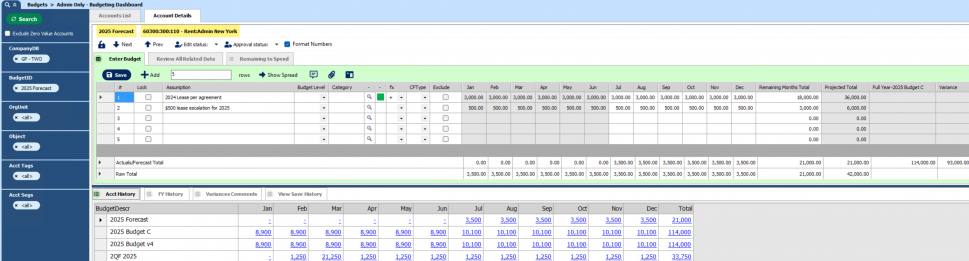
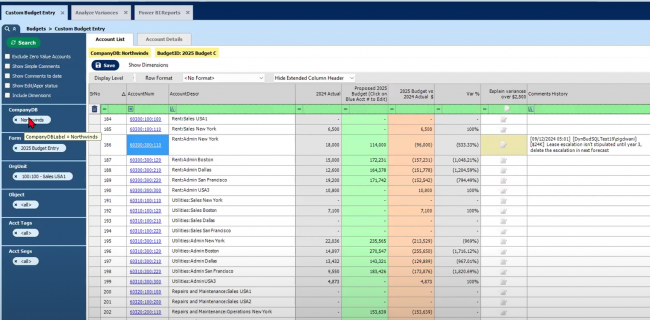
Budget the way you report. Maintain clean rollups across multiple dimensions, including funds, programs, grants, departments, sites, and locations.

  • Dimension-aware templates
  • Consistent mapping + rollups
  • Board-friendly summaries

Approvals + audit trail

Control your process with approvals and a full history of changes — supporting defensible budgets and smoother board review.

  • Workflow & review steps
  • Who/what/when change tracking
  • Notes + supporting attachments

Driver-based budgeting

Model budgets using drivers like headcount, service volume, square footage, and program activity to improve accuracy and explainability.

  • Reusable drivers across programs
  • Scenario modeling (“what if funding changes?”)
  • Forecast updates without rebuilding templates

Allocations for shared costs

Allocate shared services across programs or departments using consistent rules and sequences — a common nonprofit requirement.

  • Multiple allocation methods
  • Staged allocation sequences
  • Statistical drivers (e.g., headcount, sqft)

Allocation modeling (visual)

Use this graphic to explain shared service cost allocations — a keyword cluster that tends to rank well (“allocation budgeting”, “nonprofit cost allocation”).

Nonprofit budgeting use cases

Grant planning & restricted funding

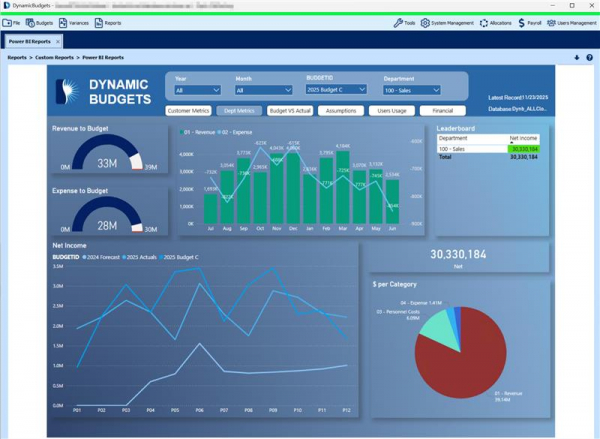
Build budgets aligned with restrictions and compare budget vs actual by grant and program.

Program-based budgeting

Model each program’s costs and funding sources with consistent rollups for leadership and board review.

Multi-site organizations

Collect inputs across sites using controlled templates and approvals — without spreadsheet sprawl.

Dynamic Budgets vs Excel vs complex CPM platforms

To outrank Solver-style sites, this section targets “alternative” intent and highlights your differentiation: budgeting-focused, fast implementation, unlimited users.

Capability Excel Dynamic Budgets Complex CPM
Unlimited users (broad participation)
Approvals + audit trail
Budget by fund / program / grant Depends
ERP-integrated actuals
Fast implementation (budgeting-first)
Simple to own & run

ROI: what improves when nonprofits move off spreadsheets

Shorter budget cycles

Reduce the time spent chasing versions, consolidating files, and re-checking rollups.

  • Centralized input
  • Workflow-based reviews
  • Less rework near deadlines

More confidence for leadership & board

Approvals and audit trails make budgets more defensible and reduce last-minute surprises.

  • Transparent changes
  • Clear accountability
  • Repeatable process year-over-year

FAQ

What is nonprofit budgeting software?

Nonprofit budgeting software helps organizations plan revenue and expenses by fund, program, grant, and department while enabling collaboration, approvals, audit trails, and reporting — without spreadsheet sprawl.

Can we budget by fund, program, and grant?

Yes. Dynamic Budgets supports dimension-based budgeting aligned to how nonprofits report (fund/program/grant/department/location and more depending on your ERP configuration).

Does Dynamic Budgets integrate with Sage Intacct, NetSuite, Business Central, or Acumatica?

Dynamic Budgets can synchronize actuals and master data from leading ERPs and optionally push approved budgets back, reducing manual exports/imports.

Is this a full CPM platform?

No — Dynamic Budgets is budgeting and forecasting focused. That’s what makes it faster to implement and easier to own compared with multi-module CPM suites.

Ready to simplify nonprofit budgeting?

Replace spreadsheets with a controlled process for budgeting by fund, program, and grant — with approvals, audit trails, and ERP-integrated actuals.

Optional internal links to add under this block: Sage Intacct budgeting · NetSuite budgeting · Budgeting without spreadsheets